Thank you New Zealand - for trusting in Mitsubishi Electric products for over 44 years.

Wi-Fi Control
Heat Pumps
Amazon Alexa enabled Wi-Fi Heat Pump Voice Control
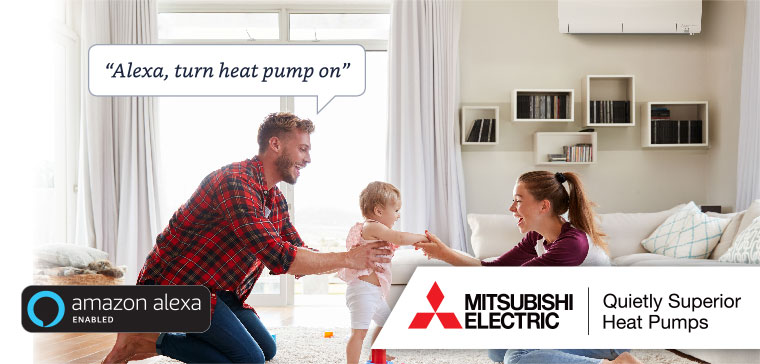
Hands-free Heat Pump Control
Hands-free Heat Pump Control
Mitsubishi Electric has integrated Wi-Fi Heat Pump Control to be used as a smart home device with Amazon Alexa. With the power of voice you can relax and take control of your heat pump to achieve the ultimate in home comfort.
For example, if you have an Alexa-enabled Wi-Fi Control heat pump installed in your lounge named 'Lounge'
Just ask Alexa...
"Alexa, turn on the lounge to 24"
"Alexa, what is the lounge set to?"
"Alexa, set the lounge to 21"
"Alexa, turn off the lounge"
How to Connect
How to Connect to Alexa
Connecting your Wi-Fi Control to Amazon Alexa is easy; simply follow the below instructions to unlock voice controlled comfort.
 How to Connect - Amazon Alexa.pdf (936 KB)
1. Set up your Wi-Fi Heat Pump Control App
If Wi-Fi Heat Pump Control is already configured and working with your heat pump continue to step two.
Otherwise, download the Wi-Fi Heat Pump Control App and follow the setup guide located under [Support] [How to Setup], to add your Mitsubishi Electric Heat Pump to Wi-Fi Control.


2. Set up your Amazon Alexa Device and App
If Alexa is already configured, then continue to step three. Otherwise, follow Amazon's guide: Set up your Echo
3. Link Alexa with Mitsubishi Electric Wi-Fi Control
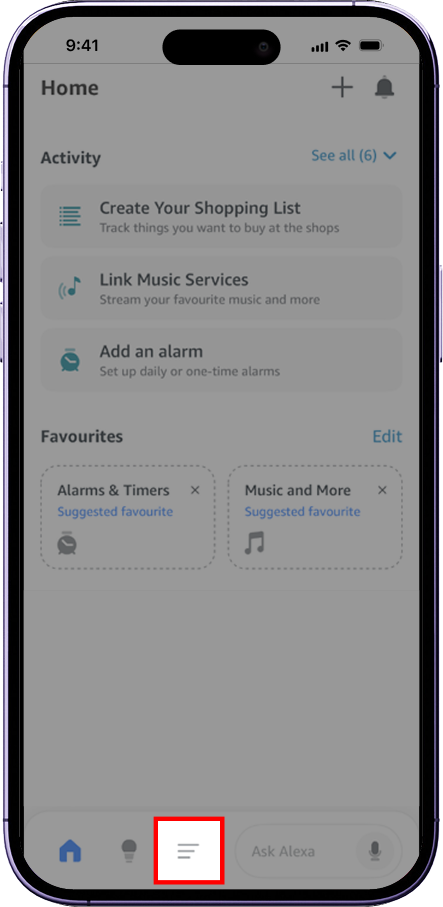
Open your Amazon Alexa app and tap the Menu icon at the bottom.
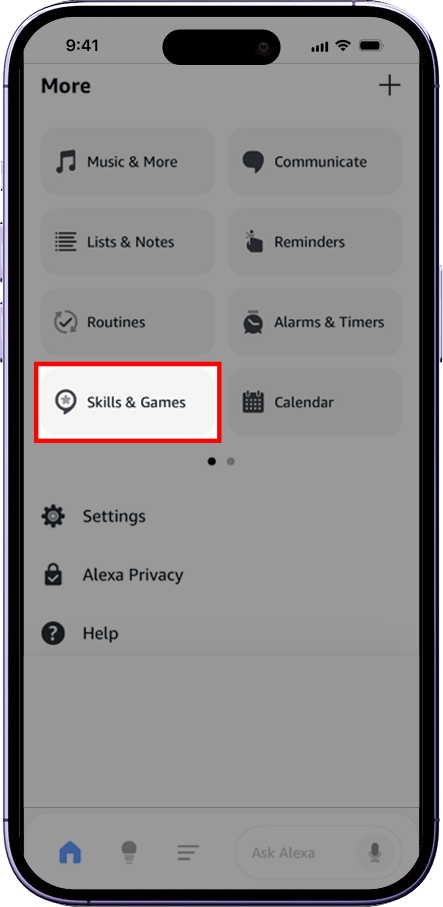
From the More menu, select Skills & Games.
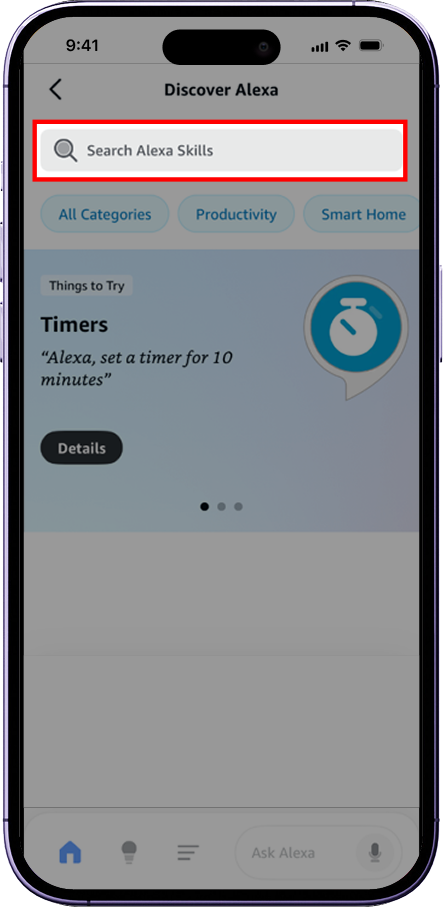
Tap the Search Alexa Skills bar and search for Mitsubishi .
If your Amazon account is set to the US, search for Melview instead.
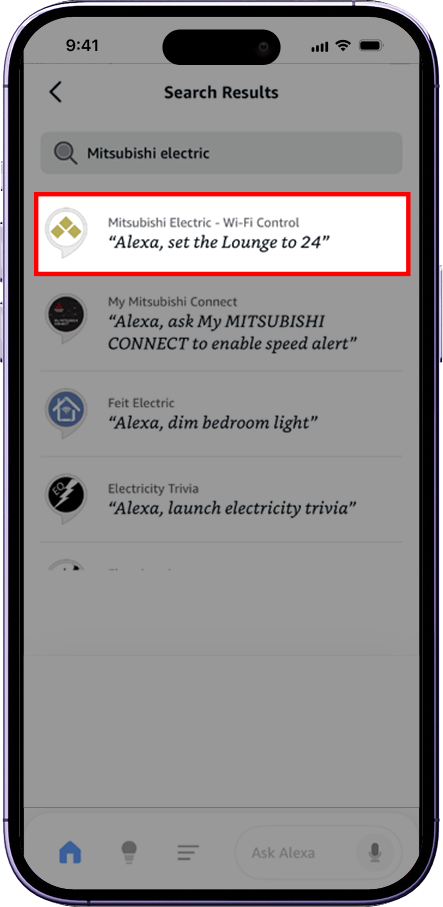
Select Mitsubishi Electric - Wi-Fi Control from the search results.
If your Amazon account is set to the US, search for Melview instead.
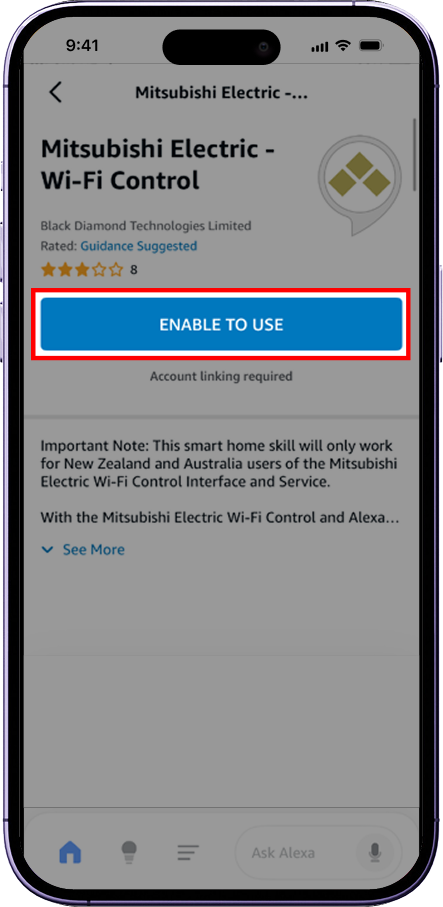
Tap ENABLE TO USE to begin linking your account.
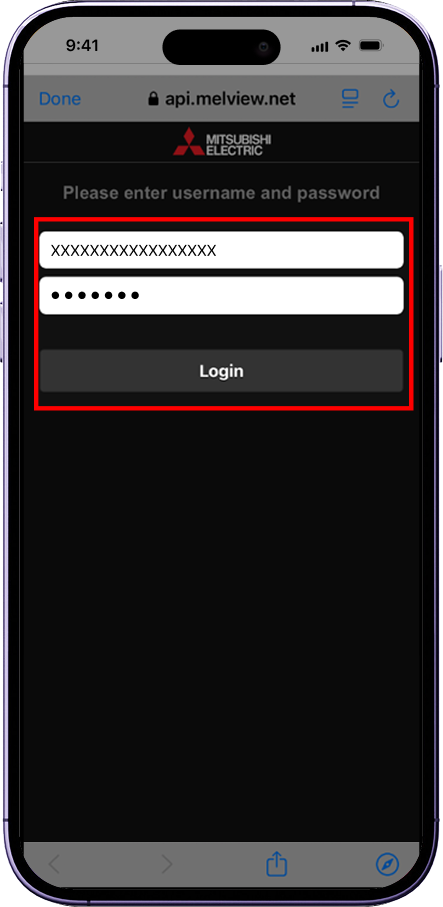
Follow the on-screen instructions and Login to your Mitsubishi Electric Wi-Fi Control Account.
Please ensure that you use your email address and password that you login to Mitsubishi Electric Wi-Fi Control with.
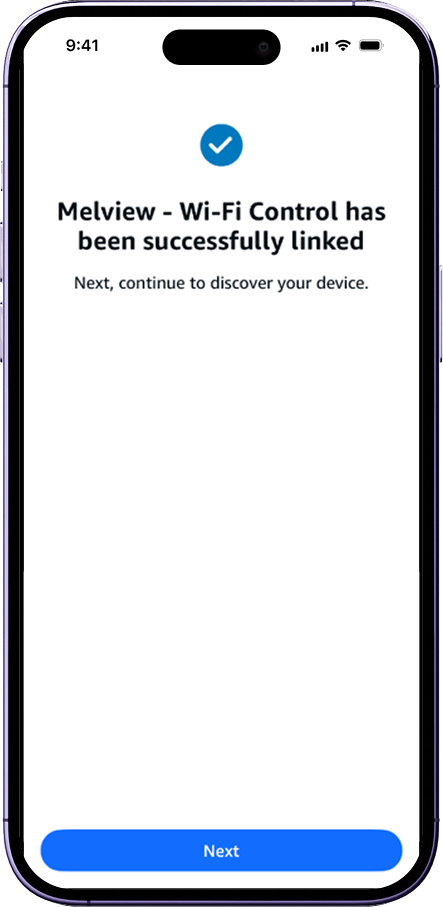
Your account is now linked. Tap Next to discover your devices.
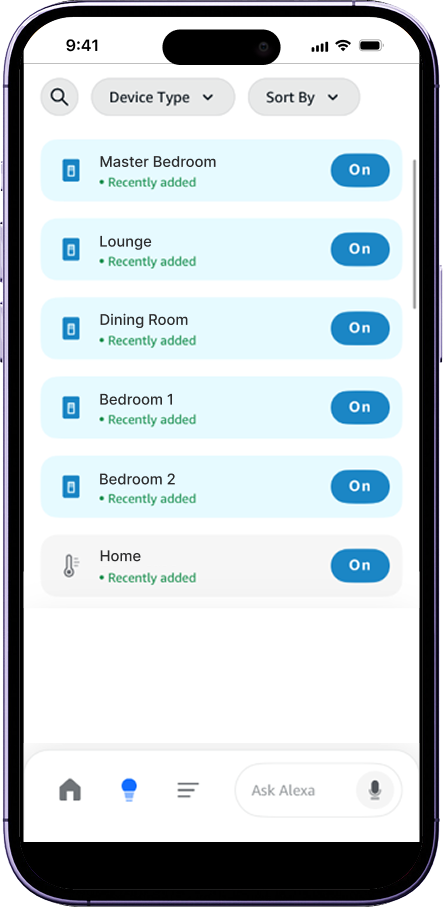
Alexa will find your heat pump(s) from Mitsubishi Electric Wi-Fi Control. You can now control them with voice commands.
For more information on connecting a Smart Home Device, follow Amazon's guide: Connect a Smart Home Device to Alexa
4. Supported Languages / Countries
Mitsubishi Electric - Wi-Fi Control is currently available for New Zealand via the following Alexa Skill Stores:
- NZ Registered Account - English (Australia)
Search for " Mitsubishi " and select Mitsubishi Electric - Wi-Fi Control - US Registered Account - English (United States)
Search for " Melview " and select Melview - Wi-Fi Control
How to Use
How to Use With Alexa
Usage Guidelines
Quick Start Tips - Amazon Alexa.pdf (665 KB)
When asking Alexa
Make sure you speak at a normal pace. Do not slow down with large pauses between words as Alexa can interpret this as the end of a request.
Turning On Heat Pump
When you ask Alexa to turn on your heat pump, it will switch on to the last setting it was set to.Setting Temperature of Heat Pump
When you ask Alexa to set the temperature of your heat pump, the following logic applies.If the heat pump is currently off
Your request will turn on the heat pump, set the temperature and adjust the mode to either heating or cooling according to your set temperature compared to the room temperature.
For example, if you ask Alexa to set the temperature to 24 degrees, and the actual room temperature is 21 degrees, the heat pump will adjust automatically to Heating Mode.If the heat pump is currently on
Your request will only adjust the temperature.Understanding Alexa's Reply - Mode
When you ask Alexa to set the temperature of your heat pump or ask what the heat pump is set to, Alexa will reply using the words 'AC' for cooling, 'Heat' for heating or 'Auto'.If you are in Cooling Mode
Alexa will reply "The AC is set to 21"If you are in Heating Mode
Alexa will reply "The heat is set to 21"If you are in Auto Mode
Alexa will reply "Auto is set to 21"Understanding Alexa's Reply - Room Temperature vs Set Temperature
Alexa can tell you what the actual room temperature is, or what the heat pump's set temperature is (what you are trying to heat or cool to). The following logic applies to a heat pump named 'lounge':Room Temperature
Ask, "Alexa, what is the lounge temperature?", Alexa will reply "The lounge temperature is 24 degrees"Heat Pump Set Temperature
Ask, "Alexa, what is the lounge set to?", Alexa will reply "The heat is set to 21" or "The AC is set to 21"Asking for Multiple Requests
Alexa does not support asking multiple requests in one question. I.e. if you want to set the heat to 21 degrees, you will need to ask, "Alexa, set lounge to 21 degrees", and then "Alexa, set lounge to heat".
Naming Your Heat Pump in the Wi-Fi Control App
- Your heat pump will have a name that you originally chose when you set up the Wi-Fi Control App. This name can be found at the top of the Wi-Fi Control App [Control unit] screen if you have one unit, or under [View all units] screen if you have multiple units connected.
- If you have not renamed your heat pump unit in the Wi-Fi Control App, the default name to use is "Thermostat". ("Alexa, turn on Thermostat")
- If this is the first time downloading and setting up the Wi-Fi Control App you will name your heat pump in the [Edit this unit] screen.
Renaming Your Alexa Discovered Heat Pump
- If you wish to rename your heat pump please do so in the Wi-Fi Control App.
- Next ask Alexa "Alexa, discover new devices" or use the Alexa app and select [Add Device] in the Smart Home section.
- This will update any changes to device names and/or find new devices.
Important: never rename the heat pump in the Alexa App, as this will cause the two apps naming to be out of sync.
Controlling a Group of Smart Home Devices
- When naming your heat pump you may want to consider if you intend to control a group of smart devices or the heat pump unit only.
- i.e. if you want to control all smart devices in a room such as your TV, heat pump and lights with one request to turn on or off, you will need to ensure you create a group in the Alexa App under [Smart Home, Groups] with these devices in it. Then you can simply say "Alexa, turn on lounge".
- Please ensure each smart device has its own unique name for individual control, as a group and device name cannot be the same.
- For example in a room with a group named 'Lounge' your heat pump should be named more uniquely as 'Lounge Heat Pump', 'Lounge AC' or 'Lounge Heater', so Alexa can recognise when you wish to control the heat pump only.
- Alexa looks at a smart group before it looks at a smart device, so if it shares a like name it will ask which one. ie group called 'My Office', Device called 'Office Heat Pump'. Ask "Alexa, what temperature is the office" and Alexa will ask you which one.
Important: if you add a heat pump to a group and then remove that heat pump from the Wi-Fi Control App, after resyncing Alexa you will still need to manually remove the heat pump from your group. (Alexa's resync will not remove the remove heat pump from a group).
How to Resync if You Have Added a New Heat Pump Unit in Your Wi-Fi Control App
- Just ask Alexa "Alexa, discover new devices" or use the Alexa app and select [Add Device] in Smart Home section.
- This will update any changed device names and/or find new devices.
Delete a Heat Pump Unit in Your Wi-Fi Control App
If you delete a heat pump unit from your Wi-Fi Control App you will need to manually remove this from your Alexa Smart Home Devices.
Voice Examples
Voice Examples
For example, if you have an Alexa-enabled Wi-Fi Control heat pump installed in your lounge named 'Lounge'
Only works when one heat pump / thermostat is connected to Alexa - as such no need to include the units name when asking.
To turn on a heat pump, ask Alexa
"Alexa, turn the lounge on"
"Alexa, turn the lounge on to 24"
"Alexa, turn on the lounge"
"Alexa, turn on the lounge to 24"
"Alexa, set the lounge to 21"
To turn off a heat pump, ask Alexa
"Alexa, turn off the lounge"
"Alexa, turn the lounge off"
To set a temperature, ask Alexa
"Alexa, set the lounge to 21"
"Alexa, set the lounge temperature to 20"
"Alexa, make the lounge temperature 24"
"Alexa, turn on the lounge to 24"
"Alexa, turn the lounge on to 24"
"Alexa, set temperature to 20"
To set a mode, ask Alexa
"Alexa, set the lounge to cool"
"Alexa, set the lounge to cooling"
"Alexa, set the lounge to heat"
"Alexa, set the lounge to heating"
"Alexa, set the lounge to auto"
To hear the room temperature, ask Alexa
"Alexa, what is the temperature in the lounge?"
"Alexa, what is the lounge temperature?"
"Alexa, what is the room temperature?
"Alexa, what is the temperature inside?
To hear what the heat pump is set to, ask Alexa
"Alexa, what is the lounge set to?"
"Alexa, is the lounge on?"
To adjust the temperature up, ask Alexa
"Alexa, make the lounge warmer"
"Alexa, make it warmer in the lounge"
"Alexa, raise the lounge by 2 degrees"
"Alexa, increase the lounge by 2 degrees"
"Alexa, turn up the lounge by 2 degrees"
"Alexa, make it hotter"
"Alexa, turn up the heat"
"Alexa, turn up the temperature by 2"
"Alexa, raise the temperature"
"Alexa, raise the temperature by 2"
To adjust the temperature down, ask Alexa
"Alexa, make the lounge cooler"
"Alexa, lower the lounge by 2 degrees"
"Alexa, decrease the lounge by 2 degrees"
"Alexa, make it cooler"
"Alexa, reduce the temperature"
"Alexa, turn down the heat"
How does it Work
How does Alexa work with the Wi-Fi Control
For example, if you have an Alexa-enabled Wi-Fi Control heat pump installed in your room, named 'Lounge'
Just Ask Alexa...
- "Alexa, turn lounge on to 24 degrees"
- Alexa will send your request to its cloud-based Voice Service over the internet.
- Alexa's cloud-based Voice Service sends a request to Mitsubishi Electric Wi-Fi Control Service and waits for a reply.
- Mitsubishi Electric's Wi-Fi Control Service sends your heat pump command to the connected heat pump.
- The connected heat pump will respond with its status Mitsubishi Electric Wi-Fi Control Service.
- Mitsubishi Electric Wi-Fi Control Service relays back to Alexa's Cloud Base Voice Service that the command has been actioned or a response to a question.
- Alexa's cloud-based Voice Service responds with... "The heat is set to 24"
Amazon, Alexa and all related logos are trademarks of Amazon.com, Inc. or its affiliates.
Amazon Alexa